Interpreting Gaussian
Failed calculations
You should get a ‘failed’ folder after move_complete.py, vim the log files and find out what went wrong. Look at end of the log files for help with what went wrong. Common errors are in section below. (Hint: typing ‘G’ moves to bottom of file in vim, ‘gg’ moves to top)
Common errors
Galloc error
These mean someone on the node (physical computer your calculation is actually running on in the BlueCrystal computing cluster) has used up too much memory so your calculation doesn’t have enough so has been killed midway through.
Answer: Resubmit file
‘Error termination in link 9999’
This (might) mean the structure hasn’t optimised and as hit the max number of steps to converge to a minima. Several options for dealing with these. Have a chat with someone who seems to know what they’re doing.
Interpretation of com files
com files contain all the information about the calculation we want Gaussian to do. In the below case:
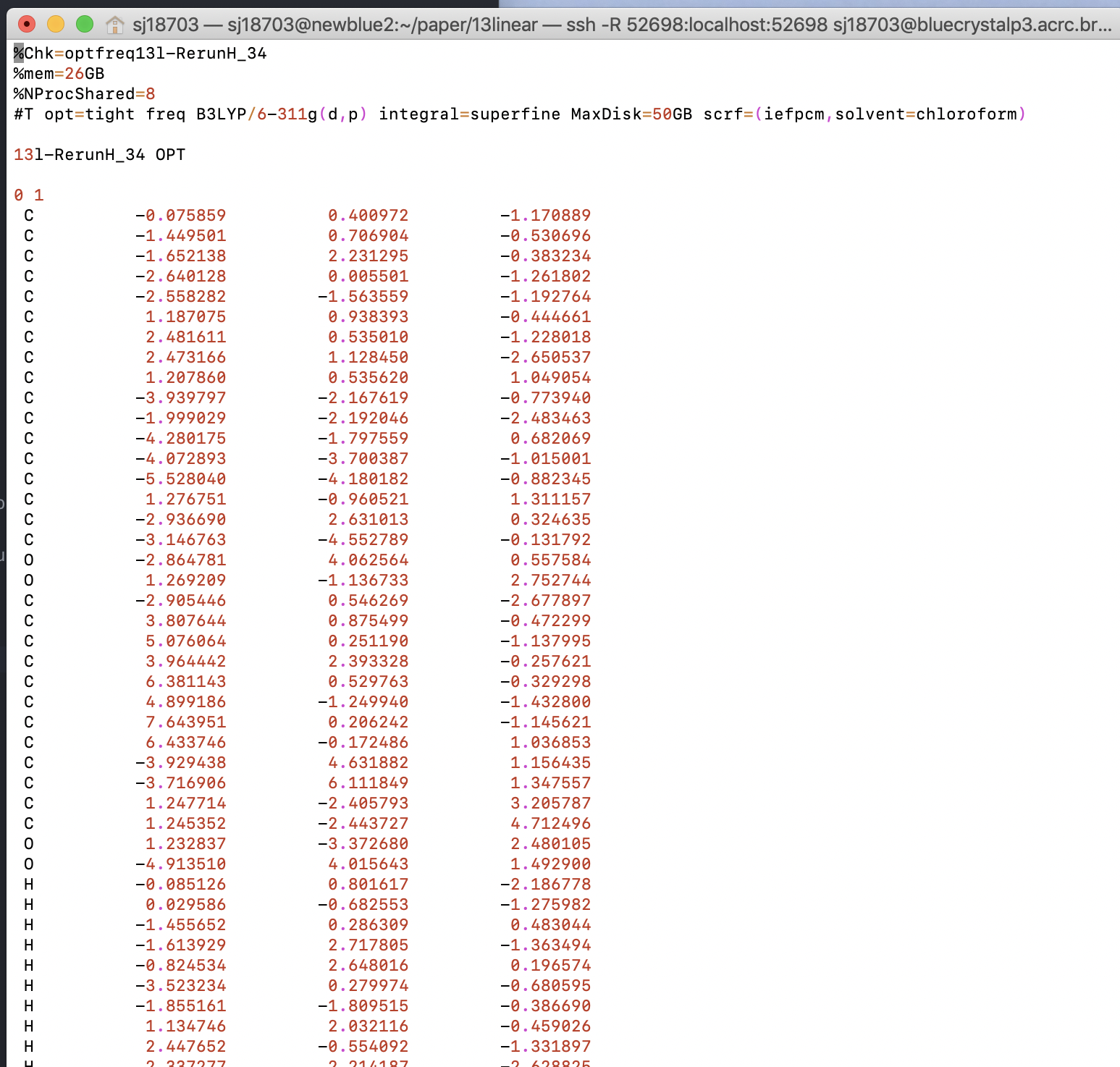
Line by line analysis:
%chk is short for checkpoint, it says store the intermediate results of the calculation in a checkpoint file called blah.chk
%NoSave tells Gaussian not to save the checkpoint file (with intermediate calculations) if the job completes perfectly (because they’re quite large 50MB files that add up to many TB if you do alot of DFT)
%mem specifies how much (random access, fast for calculation) memory we’ve told Gaussian it can use, here it’s 28GB (always less than what we’ve asked for from BlueCrystal which in this case is 32GB because Gaussian is often naughty and takes more memory than it’s given so we’ve put in a 4GB buffer in this case)
%NProcShared specifies how many cores we give Gaussian (and how many we’ve requested from BlueCrystal), processor is synonymous with core here, you likely have an Intel quad-core i5, so 4 (quad). More processors = more memory = (probably) faster.
Lots for the next line:
opt = tight: Do a geometry optimisation with tight convergence - This means distort the structure from the one you’ve inputted until it’s a minima with certain criteria (tight in this case)
freq: After you’ve found that minima find the vibrational frequencies of the vibrational modes of that structure. From this it calculates the zero-point energy of the conformer
B3LYP: This is functional for the DFT calculation
6-311G(d,p): This is the basis set for the DFT calculation
Integral = superfine: This is the grid size, bigger grids are like approximating curves with more points. But the more points the more expensive a calculation is
MaxDisk=50GB: Specifies to Gaussian not to go mental and try and store over 50GB worth of data for this run. You can ignore this, it’s just a backstop.
scrf=(iefpcm, solvent=chloroform): scrf is implicit inclusion of solvent via a ‘reaction field’ (this means looking at charges on outside of the conformer) and allowing them to interact with a polarisable field (based off of the solvents dielectric constant). iefpcm is the integral equation formalism of the polarisable continuum model, it’s just a way it judges the surface of the molecule which interacts with the solvent ‘field’. We’ve specfied chloroform as solvent.
13l-RerunH_34 OPT: Name of Gaussian job, not really relevant if you use Maestro
0 1: 0 for charge as it’s a neutral molecule, 1 for spin multiplicity (it’s singlet state) - all the electrons are paired, it’s a ‘normal’ molecule
C -0.075859 0.400972 -1.170889: C for Carbon, then x y z coordinates (origin is centre of mass for molecule generally, doesn’t matter.)
Interpreting BlueCrystal
Walltime - How long you’ve given the job to complete. If the job overruns this time BlueCrystal will terminate the job unfinished.